Jacky
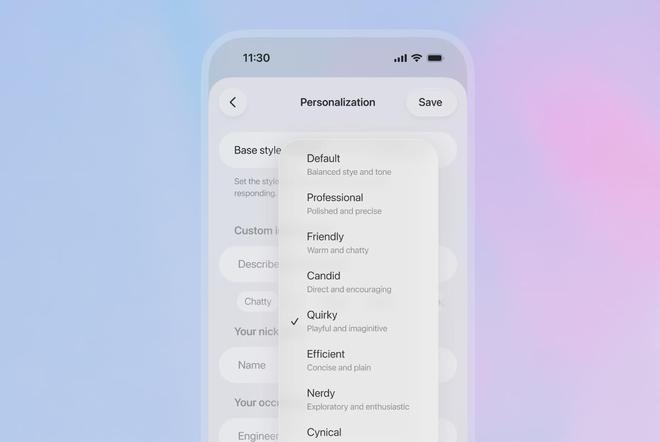
This week, OpenAI released GPT-5.1, an updated version of GPT-5 designed to deliver a more “human-like” conversational experience. It introduces two primary interaction modes: GPT-5.1 Instant for fast, friendly, and instruction-following chats, and GPT-5.1 Thinking for slower, more deliberate multi-step reasoning on complex tasks. An Auto mode automatically selects the most suitable mode based on the user’s input.
GPT-5.1 also offers a richer set of personality presets — including Default, Professional, Friendly, Honest, Witty, Efficient, Nerdy, and Sarcastic — allowing users to fine-tune the tone of responses. While the announcement doesn’t detail specific improvements in reasoning or benchmark performance, the older GPT-5 model will remain available for several months.
Reviews suggest that GPT-5.1 feels warmer and more personalized, addressing previous criticisms that GPT-5 lacked character. It also shows better responsiveness and instruction-following during interactive chats. TechRadarcalled it “more capable and controllable in daily use,” while Digital Trendsnoted, “I still prefer Gemini, but the GPT-5.1 update might make ChatGPT the AI assistant you actually want to use.”
Additionally, OpenAI has enhanced collaboration features in ChatGPT. GPT-5.1 now allows multiple users to join the same conversation, particularly useful for group projects, planning, or study sessions. Friends can be invited to ongoing chats, with the AI responding to each person in context, creating a more shared and interactive experience.
Look for continuity without constant callbacks
A companion should use remembered context when it helps, not repeatedly announce that it remembers. Good continuity reduces the need for the user to restate important information and makes recurring activities easier to resume.
If every response references old history, personalization can feel forced rather than natural.
Check how the system handles a mistake
Correct a fact, reject a suggestion or change topic abruptly. The companion should repair the interaction and update the relevant state instead of arguing or repeating the same assumption later.
Evaluate whether the relationship remains user-led
Notifications, progression and premium features should support the user’s chosen interaction rather than manufacture urgency. Quiet hours, frequency controls and easy cancellation are practical signs that the product respects the user’s pace.
Compare richer media with the core conversation
Voice, images and video are valuable when they reinforce the same identity. If media quality is inconsistent or arrives too slowly, a simpler response may produce a better overall experience.
Test the product over more than one session
A first conversation can show personality, but long-term quality appears only after the system has accumulated memory, preferences and notifications. Return later, change a preference and see whether the companion adapts without losing its core identity.
Longitudinal testing also exposes repetition and stale context that a short demo cannot reveal.
Use controls as part of the quality test
Try the memory, notification, privacy and reset controls before you need them. A strong companion should make important settings understandable without forcing the user to delete the entire relationship to repair one problem.
The best experience becomes more relevant over time while remaining easy to correct.
A final long-term check
Repeat the same test after several days and after changing one setting. AI products accumulate memory, synchronization state and billing or permission history, so problems may appear only after the first-session novelty has passed.
The strongest products remain understandable as history grows: users can see what changed, correct the relevant state and continue without rebuilding the entire relationship.


 admin